 The future of identity operations is here. Meet Persona AI →

How Persona strengthens NFC verification with server-side authentication



Near-field communication (NFC) verification can offer high assurance during identity verification because organizations receive cryptographic evidence that a document is authentic. However, the strength of that evidence can depend on how the verification happens.
Persona’s NFC verification pairs server-side authentication with layered checks for trusted issuance, data integrity, and chip authenticity. These checks detect fabricated credentials, substituted portraits, and copied chip data.
Below, we explain why this approach can help improve NFC-based verifications and share two examples of how Persona’s customers used NFC-based verifications to stop fraudsters.
Why use NFC for identity verification?
Organizations are adding NFC verifications to their Know Your Customer (KYC) and onboarding processes because it can offer more assurance than analyzing images of someone’s ID.
With NFC-based identity verification, they can securely collect data from the NFC chip in a user’s government-issued ID. The chips have digital signatures, which confirm whether the data comes from the issuing authority and if it was altered.
As AI gets better at generating fake IDs, the non-visual signals and checks from NFC verification may become more important for detecting bad actors.
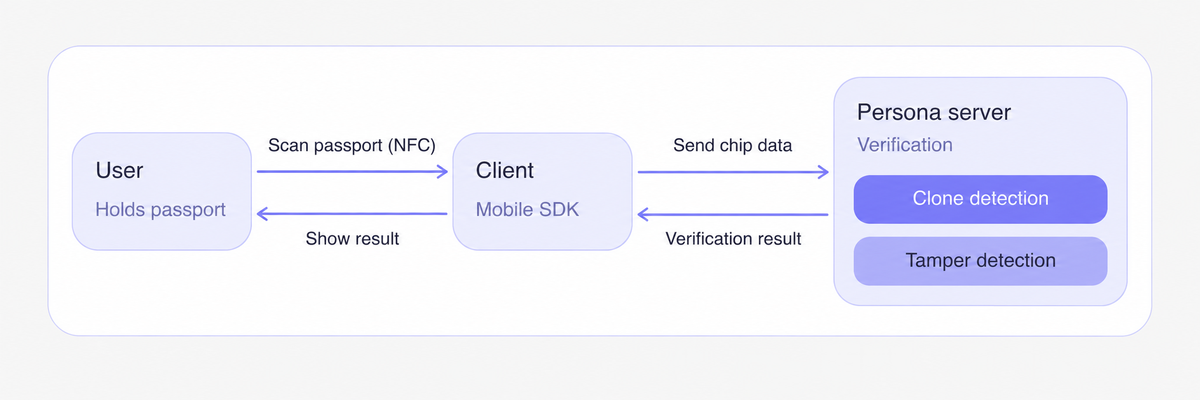
Server-side NFC authentication protects against several fraud vectors
Users scan their NFC-enabled ID with their phone to complete an NFC verification check. These checks are often accompanied by a selfie with liveness checks and, when possible, a comparison of the selfie with the person’s portrait from the NFC chip.
With some systems, the user’s device reads and verifies the data from the NFC chip. However, that opens up a potential attack vector if bad actors can jailbreak or root the mobile device.
With server-mediated NFC, Persona’s servers run the authentication checks, and the phone (the client) acts as a bridge. Server-side authentication protects against fraudsters who:
Alter the data in a valid NFC chip
Use a tampered NFC chip to attempt to trick verifications
Compromise the mobile device used for the verification
Inject data into the verification process
Change a failed result into a successful one.
With server-side authentication, Persona evaluates the chip, data, and verification responses directly instead of trusting the user’s device. Here’s how it works.
Passive Authentication verifies the data
Passive Authentication (PA) confirms the data from the chip came from a trusted issuing authority and that it wasn’t tampered with. PA involves two checks:
Signature validity: Checks the security object’s digital signature and builds a certificate chain back to a trusted issuing authority.
Data integrity: Recalculates the hashes of the chip data and compares them with the signed hashes.
PA can help verify whether the data on the chip was tampered with, but it doesn’t require the chip to pass a new cryptographic challenge and won’t detect when someone clones an authentic chip.
Passive authentication
The server checks that the e-passport data is untouched. Step through what it reads and which pieces it checks.
- DG1: DetailsName, number, dates
- DG2: PhotoFace image
- SODSigned hash list
- DG1: DetailsName, number, dates
- DG2: PhotoFace image
- SODSigned hash list
The chip hands over its files.
It sends its data groups (DG) and the Document Security Object (SOD), a list of hashes the issuing country signed. No challenge, no secrets.
Active Authentication and Chip Authentication detect cloned chips
Fraudsters can copy a genuine chip’s data, including its digital signature, onto another chip. Clone detection can help verify whether the chip is the original or a clone by checking if the chip has an uncopiable private key. Persona supports two methods for clone detection with server-side authentication.
Active Authentication (AA). Persona sends the chip an unpredictable challenge and the chip signs it with its private key. We check the response with the matching public key, which PA has already confirmed as authentic. A cloned chip can’t pass because it doesn’t have the private key.
Active authentication
The server challenges the chip to prove it holds a private key. Step through the challenge and the answer that comes back.
- Chip’s public keyCopied from the chip
- Public keyAnyone can copy it
- Private keyNever leaves the chip
The server fetches the chip’s public key.
The Document Security Object (SOD) covers the public key, so passive authentication already vouches for it.
Chip Authentication (CA). Instead of asking the chip to sign a challenge, Persona generates a temporary key pair and exchanges public-key information with the chip. Each side derives shared session keys from their private key and the other side’s public key. If communication works with those session keys, the chip holds the expected private key. CA is a newer anti-cloning mechanism that also sets up a secure communication channel.
Chip authentication
The server and the chip agree on a secret that only the real chip can derive. Step through the key exchange.
- Chip’s public keyCopied from the chip
- Static public keyAnyone can copy it
- Static private keyNever leaves the chip
The server copies the chip’s public key.
DG14, a data group, holds the public half of the chip’s static key. The Document Security Object (SOD) signs it, so passive authentication already vouches for it.
Tamper detection and clone detection work together. PA confirms that the data is authentic and unchanged, including the public keys. AA or CA then confirm the chip holds the matching private key.
NFC verification in practice with two real examples
These real fraud attempts that Persona encountered show why Persona pairs Passive Authentication with Chip and Active Authentication.
Case 1: Passive Authentication flags an untrustworthy certificate
A crypto exchange verifies every new user’s identity to comply with KYC/AML rules. For higher withdrawal limits it also asks users to tap their passport, because NFC verification is harder to fake than image-based government ID checks.
One user made a large withdrawal and their NFC verification included identity details, a portrait, and a digital signature. The portrait matched their selfie, and the digital signature verified against the supplied certificate. However, the portrait and signature checks didn’t prove that a government issued the document.
When running PA, Persona couldn’t trace the supplied certificate to a trusted government authority, so we flagged the verification even though the data was internally consistent.
Case 2: Chip Authentication catches a replayed session
A digital bank looks for ways to remove friction during new user onboarding. Regulators require KYC, and the bank asks new customers to take a selfie and go through an NFC verification. It also checks the details against credit bureau records.
One user’s submitted NFC session looked complete. It had valid identity data, a portrait that matched the selfie, and a security object that passed passive authentication. However, we believe the fraudster didn’t have the actual passport and that they’d previously scanned the victim’s passport to capture NFC chip data. Then they submitted the data through an emulator and hoped we would accept it.
Persona Chip Authentication started a fresh key agreement using the chip’s public key and a new key generated for the session. Only a chip holding the matching private key could produce the session keys. The recorded responses were encrypted and authenticated under an old session’s keys, so they failed verification.
Test your knowledge: Which authentication check detects each fraud attempt?
Which NFC check catches it?
A fraudster swaps the photo in genuine passport chip data for their own. Which check catches it?
Strong NFC verification as part of your complete identity platform
Persona’s NFC verification checks the full chain of evidence: who issued the document, whether the data was tampered with, and (when supported) whether the chip holds its protected private key. To improve security, we run these checks on our servers instead of trusting a potentially compromised device.
With Persona’s identity platform, you can also combine NFC with selfie verification, liveness checks, deepfake detection, and other verification methods. You can configure each flow for your users, risk levels, and requirements. As EU Digital Identity (EUDI) Wallets and other digital IDs roll out, you can add them to the Persona platform to support customers with different types of documents and preferences.
The information provided is not intended to constitute legal advice; all information provided is for general informational purposes only and may not constitute the most up-to-date information. Any links to other third-party websites are only for the convenience of the reader.